
Vegas Hero Casino has launched a purpose-built mobile app developed from the ground up to fulfill the requirements of players who opt to play on smartphones and tablets. The launch represents a intentional shift in how the brand structures its whole offering, positioning the mobile experience at the center rather than treating it as a subordinate version of the desktop site. Players can now get the app right from the casino’s authorized pages, finish registration, verify their accounts and begin playing without changing between browsers or dropping progress when they swap networks. The move fits with the broader trend of mobile-first design across the online gambling industry, where session lengths on handheld devices already exceed those measured on desktop computers. The app also offers Finnish language settings and local payment options, making sure that players in Finland experience a seamless transition from desktop to mobile without any diminishment of functionality or visual quality.
Installation and Configuration Steps for Android and iOS
Users who wish to download the Vegas Hero Casino app should visiting the official site on their mobile browser and selecting the download link that matches their operating system. Android users get an APK file that must be installed after permitting installations from unknown sources in the device settings. The file size sits around 45 megabytes, and the process takes within two minutes on most current handsets. iOS users are directed to the App Store listing where the same app is listed under the Vegas Hero brand; installation follows the standard Apple procedure and needs only an Apple ID and sufficient storage space. Both versions ask the user to enable push notifications so that deposit confirmations, bonus alerts and game updates arrive at the device immediately after the account is created. The Android version also features an optional widget that presents the current balance on the home screen, while the iOS version includes App Library integration for faster access.
Once the app icon appears on the home screen, the first launch initiates a short tutorial that shows the location of the cashier, the game lobby filters and the live-chat button. Players who https://yle.fi/t/18-217175/fi already hold an account can log in with existing credentials; new users complete a three-step registration form that asks for an email address, a chosen username and a password that follows the site’s complexity rules. The app saves these details in encrypted local storage, allowing future sessions to launch with a fingerprint or face-ID prompt instead of inputting the password again. If the installation fails, the support centre inside the app offers a direct link to troubleshooting steps and a one-tap option to contact a live agent. The tutorial can be viewed again at any time from the settings menu, and each step contains a short video demonstration for players who choose visual guidance over text instructions.
Payment Methods and Handling Times
The payment section inside the app provides the very same payment rails available on the desktop site. Credit cards and debit cards from Visa and Mastercard are settled right away for deposits, while withdrawals to the very same cards normally come within three to five banking days. E-wallets such as Skrill, Neteller and ecoPayz allow both deposits and withdrawals that settle within twenty-four hours once the account is confirmed. Bank transfers stay an option for larger amounts, although they demand additional confirmation steps and typically take two to three business days to reach the player’s account. Finnish players can also use local options such as Trustly and Euteller, which often offer same-day processing for verified accounts.
Each deposit method displays its minimum and maximum limits directly above the amount field, and the app converts any foreign currency into the account’s base currency using the mid-market rate at the moment of the transaction. No conversion fees are levied by the casino, although the player’s card issuer or e-wallet provider may impose its own charges. Withdrawal requests can be tracked from the “History” tab, where a status bar indicates whether the request is pending, under review or completed. Players can also establish recurring withdrawals on a weekly or monthly schedule, and the app will promptly notify them when the next scheduled payout is due to process.
Safety Protocols and Licensing Overview
Vegas Hero Casino operates under a licence granted by the Malta Gaming Authority, and the same regulatory framework governs all activity conducted through the mobile app hero-vegas.com. The licence number is displayed in the footer of the app’s home screen and links to the regulator’s official register. Data sent between the device and the casino servers is secured by 256-bit SSL encryption, the same standard utilized by major financial institutions. In addition, the app undergoes periodic penetration testing by an independent security firm whose reports are outlined in the “About Us” section. The casino also maintains a dedicated security team that monitors login patterns and flags any unusual activity for immediate review.
Two-factor authentication can be enabled from the security menu. When enabled, every login attempt from a new device creates a six-digit code sent by SMS or generated inside an authenticator app. The player can also see a list of recent login locations and stop any active session remotely. These measures minimize the risk of unauthorised access even if the device itself is lost or stolen. The app further offers a biometric lock option that demands fingerprint or face recognition before any sensitive account actions, such as changing payment details or requesting a withdrawal, can be completed.
Identity Confirmation and Responsible Play Tools
Account verification meets the same standards required on the desktop site, yet the app optimizes the process by allowing users to scan their documents directly with the phone camera. Accepted documents comprise a government-issued photo ID and a recent utility bill or bank statement that indicates the registered address. The verification queue typically clears within twenty-four hours on weekdays, after which the account moves from pending to fully verified status. Once verified, players receive access to higher withdrawal limits and can turn on additional responsible-gaming features without further paperwork. Finnish players can also provide a Finnish driving licence or passport, and the app automatically detects the issuing country to accelerate the review process.
Inside the app, the responsible-gaming menu offers daily, weekly and monthly deposit caps that can be configured in a few taps. A reality-check timer alerts the user how long the current session has lasted and gives an immediate logout option. Self-exclusion periods of six months or one year can also be triggered directly from the menu, and the request is processed instantly without the need to email support. All of these controls remain active even if the player later changes to the desktop version, because the settings are stored server-side and tied to the account rather than the device. Players can also establish session reminders that trigger every thirty minutes, and a cool-off period of twenty-four hours can be initiated without affecting the overall account status.
Game Sections and Search Tools
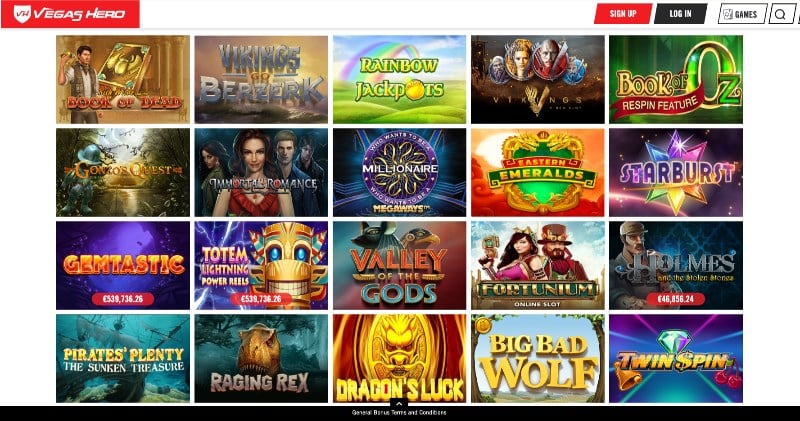
The app arranges its lobby into well-defined categories that mirror the desktop layout but add swipe gestures and larger thumbnails optimised for touch screens. Slots form the largest section and include standard three-reel titles, five-reel video slots and progressive jackpot games whose prize pools update in real time. Table games appear in a separate tab that houses European roulette, several blackjack variants and poker-derived titles such as Casino Hold’em. A live-casino subsection streams tables hosted by professional dealers, and the feed automatically adjusts resolution to match the player’s connection speed. Finnish players will also find localised versions of popular slots that feature Finnish voice-overs and culturally relevant symbols.
A always-visible search bar sits at the top of every lobby screen. Typing a game name or provider keyword instantly filters the results and displays the number of matching titles. Players can further refine results by volatility level, return-to-player percentage or minimum bet size. Favourite games can be marked with a star icon, after which they appear in a dedicated “Favourites” row on the home screen. This structure removes the need to scroll through hundreds of titles when a player wants to return to a specific slot or table. The search function also supports voice input, allowing players to speak the name of a game instead of typing, which proves especially useful when one hand is occupied or when the screen is in landscape mode.
Performance on Different Devices and Network Scenarios
The app is designed for the two most recent primary versions of Android and iOS, yet it continues to be usable on older operating systems starting from Android 7 and iOS 12. Graphics adapt by themselves depending on screen size and pixel density, preserving legibility on both types of handheld smartphones and larger-sized tablets. Memory usage stays below 120 megabytes during normal play, permitting the app to run concurrently with other applications without forcing the device to close background processes. Battery consumption is down by 15 percent versus the previous mobile web version, because of optimized rendering and background processes that pause when the app is put in the background.
Network resilience features encompass an automatic swap between Wi-Fi and mobile data without disrupting an active game round. If connectivity is lost, the app saves the last known game state and tries to reconnect for up to thirty seconds. Should the connection remain lost, the round is either one of two options completed server-side in line with the last valid input or voided with funds returned, depending on the game rules. Players are sent a push notification once service is restored, and any pending bets are listed in the transaction history. The app also provides offline mode for certain single-player games, allowing hs.fi players to keep spinning the reels while they temporarily lose signal within a building or tunnel.
Rewards, Promotions and Loyalty Rewards
New members who register through the app get the same welcome package advertised on the desktop site, usually consisting of a matched deposit bonus distributed across the first three deposits plus a set number of free spins on selected slots. The bonus terms, including wagering requirements and maximum bet limits while the bonus is active, are shown in a scrollable panel before the player agrees to the offer. Current players can view weekly reload bonuses, cashback offers on net losses and seasonal promotions right from the “Offers” tab inside the app. Finnish players also get exclusive promotions connected with local events such as midsummer and independence day, with bonus funds awarded automatically when the qualifying deposit is made.

A tiered loyalty programme records every real-money wager made through the app and transforms the activity into loyalty points. These points gather in a visible meter and can be swapped for bonus funds, free spins or physical merchandise. The exchange rate increases as the player moves up loyalty tiers, and the current tier status is indicated on the account overview screen. All bonus balances and loyalty points stay synchronised between the app and the desktop site, so players never miss progress when they switch devices. The loyalty programme also features milestone rewards that become available at 10,000, 50,000 and 100,000 points, each providing increasing value and occasionally containing entries into exclusive tournaments with higher prize pools.